

Direct Inbox Instagram: Find It, Sort It, Reply Fast
Updated 26 November 2026 - 10 min read

Forty DMs went out yesterday. The dashboard says sent. Two replies came back, and you're already rewriting the opening line for the fifth time. Before you touch the copy, check where the messages landed.
The Direct inbox Instagram hands you is a filter, not a mailbox. A message can leave your account, arrive on Instagram's side, and still sit in a folder the recipient never opens. That single fact explains most low reply rates on cold outreach. Placement is cheaper to fix than copy, so fix it first.
Table of Contents
- Where to Find the Direct Inbox Instagram
- Requests, Hidden Requests and Why Messages Go Missing
- How to Read, Sort and Reply to Chats
- Set Who Can Message You Without Blocking Good Leads
- Decide If a Shared Inbox Fits Your Volume
Where to Find the Direct Inbox Instagram
On your phone, tap the paper-plane icon in the top right corner of the Home screen. That opens Direct. On a browser, go to instagram.com and click the Messages icon in the left sidebar. Same inbox, with a keyboard attached, which is why long replies are easier to write on a laptop.
Five steps on the app.
- Confirm which account you're in. Every Instagram account has its own inbox. Check the profile name before you read anything, because answering from the wrong account is how a lead waits three days for a reply you think you sent.
- Tap the paper-plane icon. It sits top right on Home and holds every conversation plus your message requests.
- Scan the chat list. Each row shows a name, a preview of the last message, and a dot on the right for anything unread.
- Tap Requests at the top of the list. These are first messages from people you don't follow. They don't appear in the main list until you accept them.
- Update the app if the icon is missing. Instagram moves menu items between versions, and the top bar changes more often than the rest of the app.
That inbox has a longer history than often assumed. Wikipedia's account of Instagram Direct traces it to December 2013, when it launched as Instagram's built-in private messaging feature, and notes the September 2015 update that added threaded conversations and let people share locations, hashtag pages and profiles inside a message. The inbox grew as a person-to-person layer, not a sales channel, and the permission rules still reflect that.
Practically, that means two accounts that don't follow each other can run into request restrictions unless the recipient loosens their settings. The recipient's choices decide whether your message ever shows up in their main list, and no amount of copywriting overrides that.
A normal session takes two minutes. Clear the unread dots in the main list first, then open Requests, which holds first messages from people you haven't accepted yet. Do it in that order and you'll never leave a warm reply sitting behind a cold one.
Requests, Hidden Requests and Why Messages Go Missing
A message can be sent, delivered, and never seen. Instagram sorts incoming messages into three places before anyone reads a word, and cold outreach lands in the two that don't notify.
Anyone who treats the Direct inbox Instagram provides as a plain mailbox will read silence as rejection. The folders decide what happens first.
Primary inbox. Conversations with people you follow, and people you've already talked to, live here. It's the only folder that behaves like a normal messenger, and it's the one you should be clearing first.
Requests. Message someone who doesn't follow you and it becomes a request. It waits there until they accept, and accepting is what moves the chat into the main list. This is the folder where most first-time business conversations go to die.
Hidden Requests. Instagram also pulls requests it reads as spam-like or potentially offensive into a separate folder, with no notification at all. Real openers get misfiled there too, especially ones with links, prices or a discount code. The label shifts between app versions, so look for the Hidden Requests link inside Requests rather than trusting memory.
| Folder | Who lands here | What you can do |
|---|---|---|
| Primary inbox | People you follow and accounts you have already chatted with | Read, reply, pin or mute the chat |
| Requests | People who do not follow you and send a first message | Accept to move the chat to your inbox, delete, block or report |
| Hidden Requests (Spam) | Requests Instagram flags as spam-like or potentially offensive | Open and check by hand; no notification is sent |
Why you can't confirm where it landed
Senders get no reliable signal. No receipt says "this one is in Spam." A read receipt only shows up after acceptance, and only if the recipient hasn't turned read receipts off. So "delivered" in a campaign dashboard means Instagram accepted the call. Nothing more.
Daily habit: open Requests and Hidden Requests before you assume a lead ignored you. Thirty seconds, every morning, before any new sends.
The measurement follows from that. Meta's guidance for business messaging pushes teams to answer inside the 24-hour window and to track a real funnel instead of send counts (Meta's messaging limits documentation). That funnel is delivered messages, unique replies, qualified replies, booked calls, attended calls. Reply rates of roughly 35% to 50% get quoted for inbound conversations that started from content or ads, and they don't transfer to unsolicited cold DMs, where intent and eligibility are different.
The folder-by-folder detail, including how to accept and delete, is in this walkthrough of Instagram message requests.
If replies are low on a cold list, check the folders before you rewrite the opening line. A quiet inbox is usually a placement problem before it is a copy problem.
Ready To Automate Your Instagram Outreach?
90-Day Money-Back Guarantee
How to Read, Sort and Reply to Chats
The routine is short. Open the two folders you don't get notifications for, then answer everything that's real.
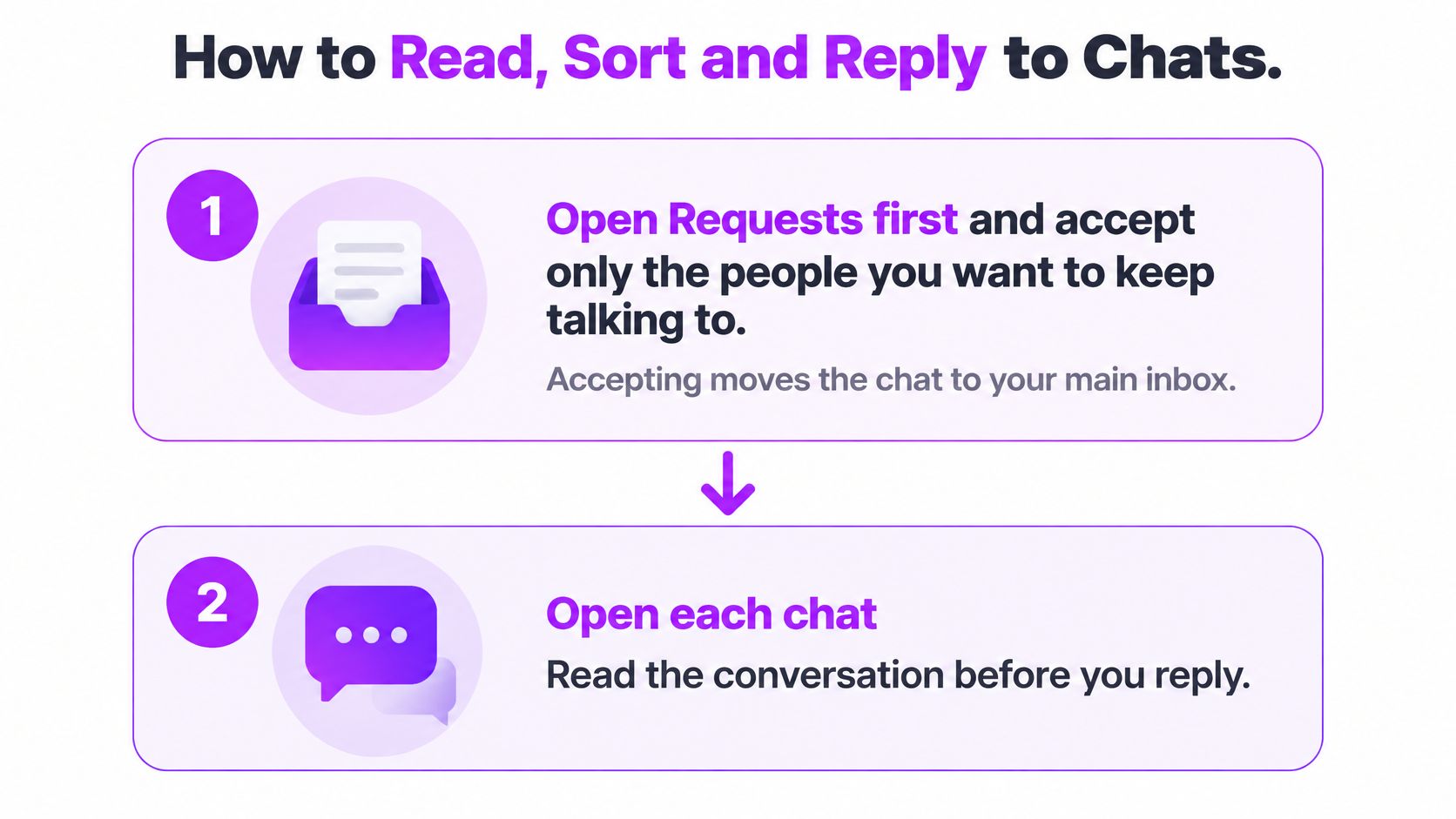
Six steps that take ten minutes
- Open Requests first and accept only the people you want to keep talking to. Accepting moves the chat into your main inbox, so an accepted chat becomes real work in your list. Decline, delete or block the rest without guilt.
- Read the whole thread before you type. Someone may have sent a profile, a post or a voice note earlier. Answering only the last line gets you "I already said that" and a lost lead.
- Reply the day they message you. Same-day replies keep threads alive. Next week is a new conversation with a colder person. For a warm lead, something like "Thanks for sharing that, Sam. Want me to send the two case studies from last quarter?" works because it asks one question. One question per message gets more answers than a list of asks.
- Pin whatever needs a decision today. Press and hold a chat to see the options. Pin the three or four that need you before lunch, and leave the rest for later.
- Use search when a lead comes back weeks later. Type the username into the search bar at the top of the chat list instead of scrolling back through a hundred threads.
- Mute finished chats and block abuse. Muting keeps a conversation without the ping. Deleting only clears your copy, so treat delete as tidying, not as ending something.
Three habits do more for reply rates than any template.
- Reply before you start new outreach. Answer the people who already talked to you before you message strangers. It protects the response window and it keeps your warm list warm.
- Keep replies under three sentences. Long replies read like a brochure and get skimmed. Short ones get answered.
- Write the next step after every reply. A date, a link, a question with two options. If a chat ends without one, it's a dead thread you'll reopen next month from scratch.
A tidy inbox looks boring. No unread dots in Requests, nothing sitting in the hidden folder, and every active chat carrying a next step you could explain in one line.
A thread with no next step is an archive, not a conversation.
Set Who Can Message You Without Blocking Good Leads
The setting lives in Settings, then Messages and story replies, then Message controls. Names shift between versions, so if you can't find it, type "message controls" into the settings search bar.
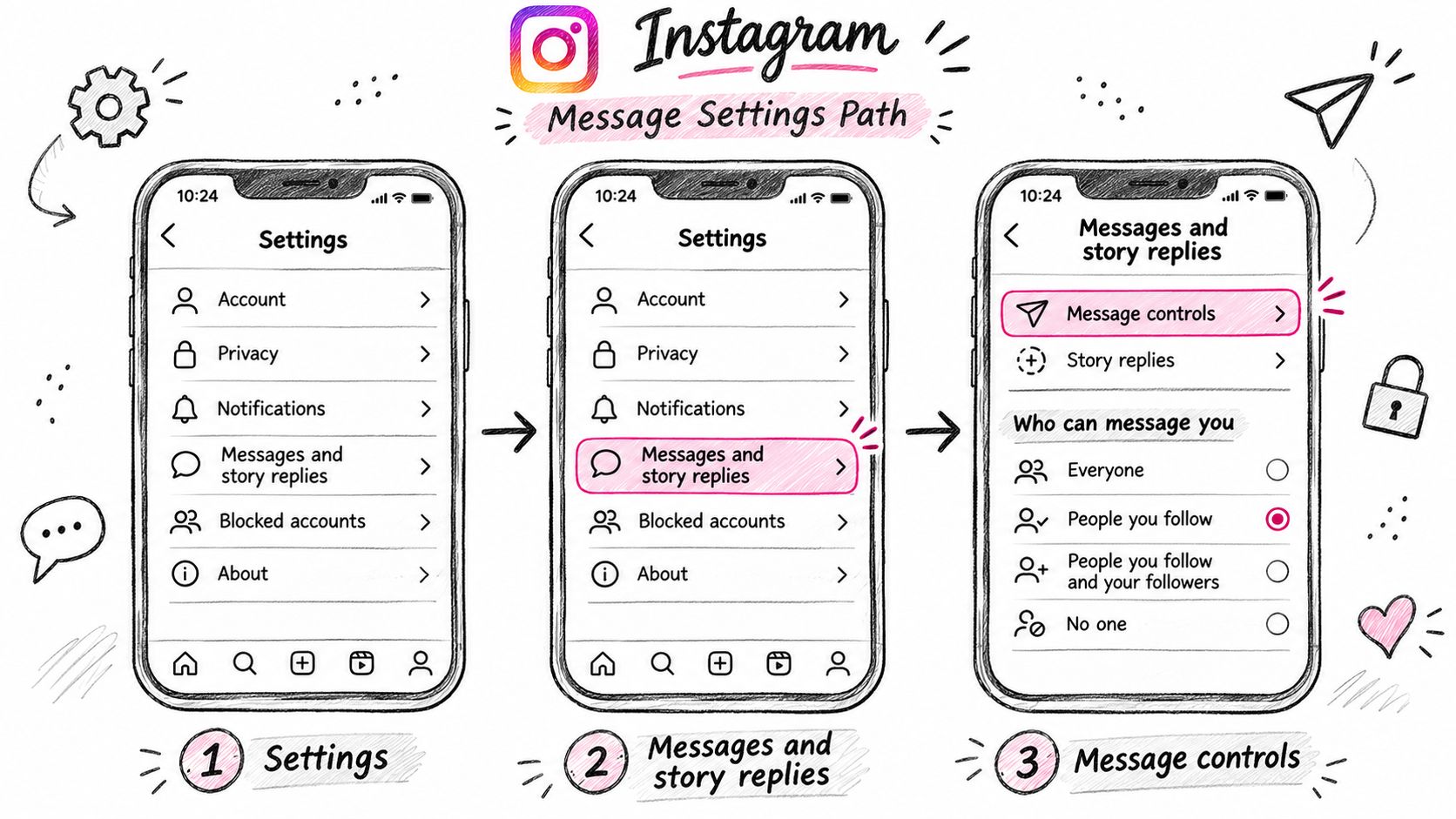
Inside Message controls you'll find who is allowed to send you message requests. Three choices, three very different inboxes.
| Setting | Who can message you | Effect on new contacts |
|---|---|---|
| Everyone (requests on) | Any account | Widest reach; expect more spam-like requests in Hidden Requests |
| People you follow | Accounts you follow | New people cannot start a chat with you |
| Requests turned off | No new accounts | Only existing chats remain open |
The trade-off is simple and worth saying out loud. A stricter setting protects your attention, and it also stops strangers from reaching you at all. If you're a coach, a freelancer or an agency whose next client has never met you, that's a tax on your pipeline, not a safety feature. If you use Instagram mainly with friends and family, tightening it costs you nothing.
Instagram doesn't publish a daily cap on message requests, or a limit on how many first messages a non-follower can send you. Anyone quoting a number is guessing. What you can measure is your own accepted conversations, so measure that instead of trusting a figure you read somewhere.
Here's how I'd test a change rather than argue about it. Switch one setting, give it a full day, then count how many new conversations you accepted and how many replies you sent. Do the same for a second setting a week later. Two data points from your own inbox beat any general advice, including mine.
Rule of thumb: if you run outreach, keep requests on and open the Requests folder every single day. The cost of daily checking is two minutes. The cost of a stricter setting is leads you'll never know existed.
One more control worth checking while you're in there. Hidden word filters can catch the words your customers use for your own service, so review the list monthly. A filter that blocks the word "price" has just blocked your best buyer.
Decide If a Shared Inbox Fits Your Volume
Start with the decision, not the tool. If you message a handful of people a week from one account and you answer every reply yourself, the native inbox is enough and the routine above covers it. Move to a shared inbox when one of three things happens.
One, more than one person answers the same account. Two people replying from memory means duplicate messages and a prospect who gets asked the same qualifying question twice.
Two, more than one account is running campaigns. Different logins, different threads, and no single view of who was already messaged. Duplicates across accounts are the fastest way to look automated.
Three, you can't say from memory which lead got which reply. That's the point where a manual routine stops being a routine and becomes a source of lost deals.
What a shared inbox actually solves
Volume isn't the problem a shared inbox fixes. Losing track is. At Nousify.ai we show every connected account's Instagram conversations inside one inbox, and you can run outreach from several accounts at the same time, each with its own campaigns, inbox and analytics. That's the difference between four browser tabs and one screen you can trust during a client call. If you're weighing options, this breakdown of the best Instagram DM automation tools covers what each kind of tool is built for.
Where it doesn't fit
Be honest with yourself about the constraints before you pay for anything.
- Campaigns run through a Chrome extension on Mac or Windows, so the computer has to stay on while messages go out. If you work from a phone and shut your laptop at six, that's a real limitation rather than a footnote.
- Inbound-only work doesn't need outbound tooling. If all you want is to answer comments from followers with an automatic reply, an inbound chatbot is the right tool. Buying outreach software for a comment problem is money spent on the wrong machine.
- No tool can promise an account stays in good standing. Meta alone decides whether to restrict or disable an account. What you can control is volume, warm-up and spacing between actions, which is why daily caps and randomized intervals matter more than clever copy.
Here's the test I'd run before making any decision. Keep the manual routine for two weeks. Count accepted conversations and replies per account, and write the numbers down. If you can keep that up on one screen, you don't need a shared inbox yet. When the routine starts breaking, when a reply sits unread or a duplicate goes out, you've found the moment to move.
Then pick your measure and stick to it. Accepted conversations and replies per account tell you the truth. Sent volume never has.
Nousify.ai finds leads, sends personalized cold DMs from your own Instagram accounts, and puts every reply into one inbox where an AI assistant can answer questions and book calls. If this article left you wondering whether your quiet inbox is a placement problem or a volume problem, tracking replies per account is the fastest way to find out. See how it works and start a trial at Nousify.ai.
Ready To Automate Your Instagram Outreach?
90-Day Money-Back Guarantee